

Profisee’s 2023 releases focused heavily on accelerating data steward productivity, advancing enterprise security, and deepening its alignment with the Microsoft ecosystem. Across two major releases (R1 and R2), the platform transitioned toward an adaptive, highly accessible approach to Master Data Management (MDM) designed to seamlessly weave trusted data into modern enterprise data fabrics.
What’s new in 2023:
Profisee release 2023 R2
The second release for the year is another series of exciting releases because it focuses on an even more immersive adaptive stewardship experience via the ability to Share Records to Teams and Outlook and embed records through external applications (Microsoft Adaptive Cards; SaaS only) and the introduction of a new OpenAI Integration (Azure OpenAI utility in Profisee Portal Form that automatically populate empty records and recommend changes) capability.
Let us get straight to the new features of 2023 R2.
Release Themes
- Integrate Microsoft Adaptive Cards
- Incorporate use of OpenAI
The key messages of this release are:
- Adapts to YOUR Organisation, data requirements and people
- Easy to deploy, easy to use and easy to expand
- ‘Weave’ all data together as part of YOUR data fabric
To help understand what Profisee defines as ‘Adaptive MDM,’ we would need to break it down to a few tiers or layers.
There are three layers of Adaptive that Profisee are focusing on.
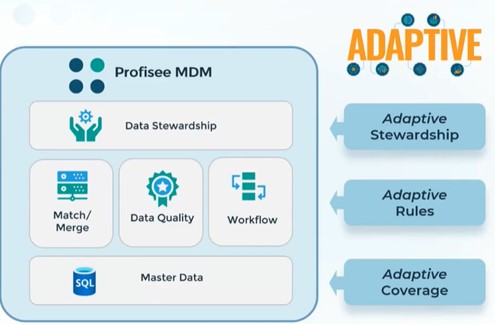
Adaptive Coverage – allows you to manage unlimited master and reference data domains.
Adaptive Rules – ability to adapt to your data model, structures, requirements and make it easier to configure your solution (Match/merge/survivorship rules to adapt to source systems and requirements).
Adaptive Stewardship – at the front-end layer, we have unlimited ‘FastApps’ that are role, task and domain-specific centric with maximum engagement with minimum effort. It is also about automating various facets of the data stewardship experience.
From my client project experiences, one of the major negative types of feedback from data stewards are the amount of effort to get things done in Profisee as part of their stewardship role. This feedback has been heard and changes made. At the end of the day, it is about making it easier for the data stewards and making their processes more streamlined.
New Capabilities for Adaptive Stewardship
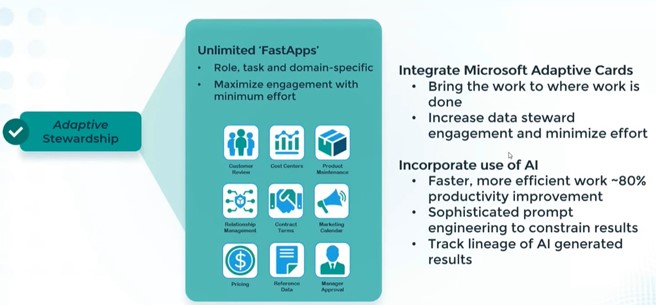
Integrate Microsoft Adaptive Cards
The goal of this feature is to allow data stewards to collaborate on Master Data Management, and to do so in a way where they can leverage the tools they are already working with (eg, initially with Microsoft Outlook and Microsoft Teams). It is all about making the tools you commonly use daily to integrate better with Profisee.
Incorporate use of AI
This is about using the Microsoft Azure Open AI service to make things faster and more efficient for data stewards, such as through prompt engineering that auto-populates values in the background.
We are all no strangers to AI technology but when we talk about AI for Master Data Management – would it work or is this just another distraction?
Now, let us look deeper into the major features of this release.
Feature #1: Azure Open AI Integration
Profisee has invested heavily into the Azure Open AI service, and we should expect further enhancements in this area in future releases. It is making use of AI technology in Master Data Management and making the overall data stewardship a much smarter way to work.
Breaking it down into three broad patterns, we have the following areas of focus.
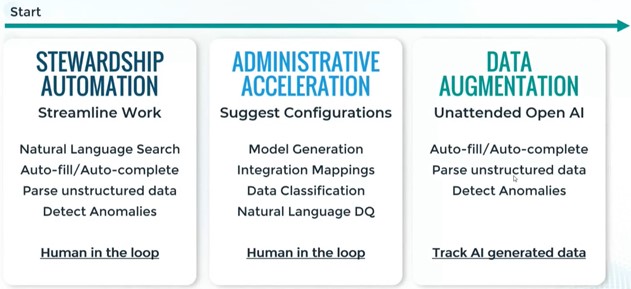
Streamline Stewardship Work
Enhancing the existing search functions of Profisee, we have now the capability to use Natural Language Search which enables Auto-fill/Auto-complete functions and parsing of unstructured data. It is about suggesting to Profisee Open AI service inputs and for it to return suggestions. The key benefit here is the use of the Natural Language search.
Looking at a longer term, Profisee is planning to apply these similar concepts to Administration such as for Model generation (suggesting entity structures for you), suggest integration mappings, data classification to support matching process and natural expression language for data quality rules for example.
Lastly, let’s talk about leveraging Open AI on the backend basis like loading a million Product records with long form descriptions and parsing them into the attributes. Data augmentation is about doing it in mass and doing it in a way that we can track which information came from more traditional sources and which came from the AI engine itself.
For me, the real difference and benefit of the Open AI service is the balance it provides from an automated perspective and the inputs from the users.
Putting it into practice, what does Natural Language Search look like you ask?
Prompt Engineering Example
Natural Language Search
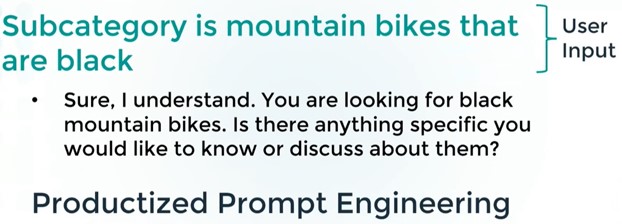
The user is asking the AI engine, what ‘Subcategory is mountain bikes that are black’?
- Profisee would respond back with a generic question back to the user.
- A request will be sent to the Azure OpenAI service and provide information about the query by the user.
There are upfront grounding and prompt engineering that is going on to help it understand and return a useful output.
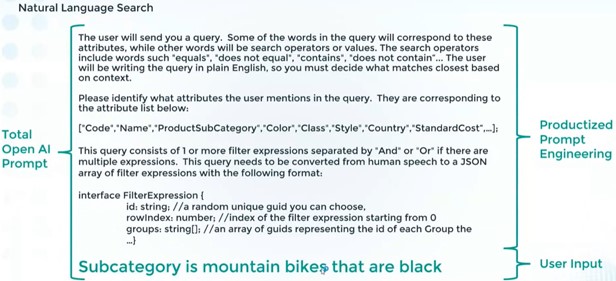
In short, we are training the AI engine on what we are trying to request, whether it is educating on the structure of the Product entity, building a filter construct, providing an available list of Domain Based Attributes or providing other information to help generate a final response back to the user.
So, where do we configure this? If we go to a portal application, we can click on the top right corner settings (gear icon), and you will see an option for ‘Open AI Admin.’
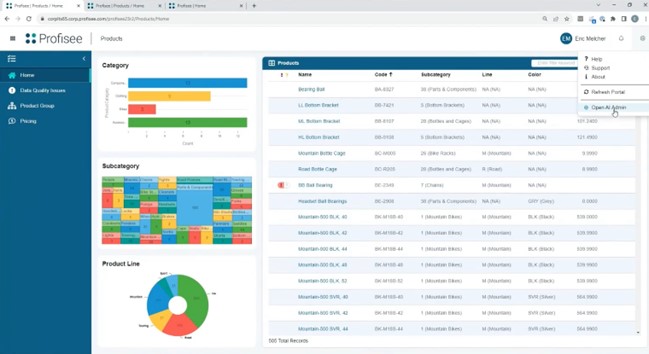
Any Super Admins can then add your ‘Open AI Endpoint’ service address (eg, GPT 4 model), and use your Open AI key. Therefore, as the admin, you can use the GPT model that best fits your situation. All your inputs are going into your Azure Tenant, and you will be able to manage the model accordingly.
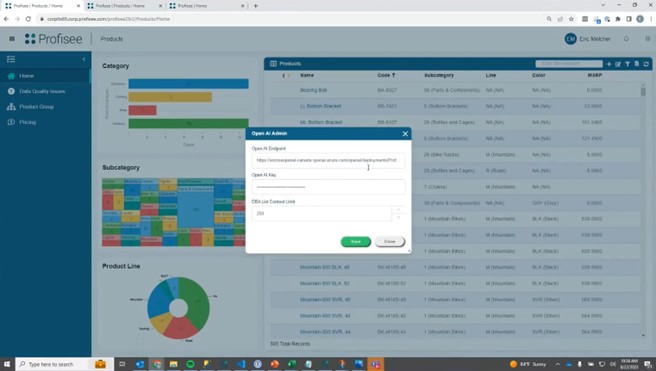
From the end user perspective, we can do this in a few places.
One place is the ‘Filter and Sort’ prompt. Instead of building out a custom filter yourself manually (one by one), you can use Natural Language to help build your custom filter.
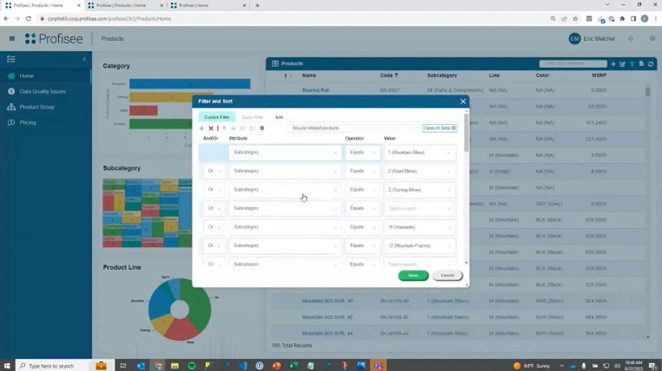
As an example, we can ask the Open AI service what are the ‘bicycle related products.’
In the backend, it will look up the entity in question and only list products related to bicycles. This provides considerable time savings for the user.
Another amazing use of the Open AI service is being able to look up product descriptions from an online retailer in the form of unstructured text.
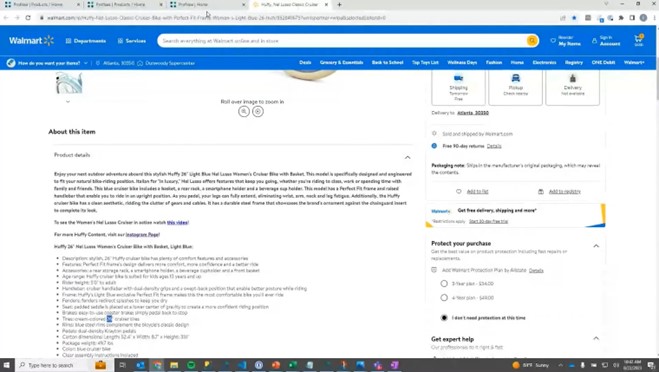
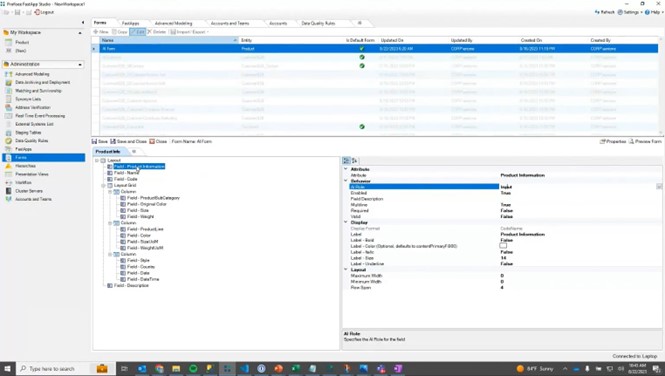
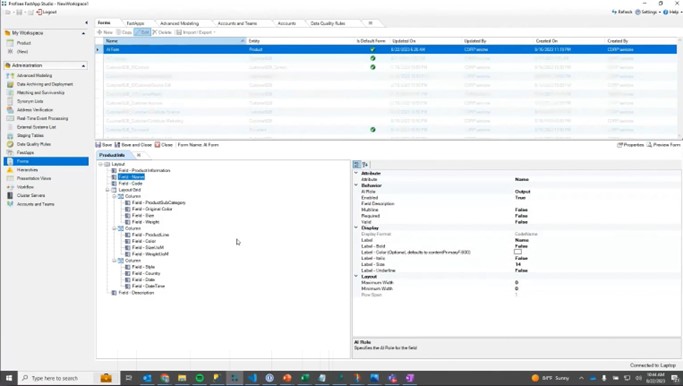
From the online retailer page, you can select and paste the unstructured Product Description text into your Profisee Form Product Info dialog box. Effectively, this is asking Profisee/Open AI to tell us what it thinks the outputs are for the form automatically.
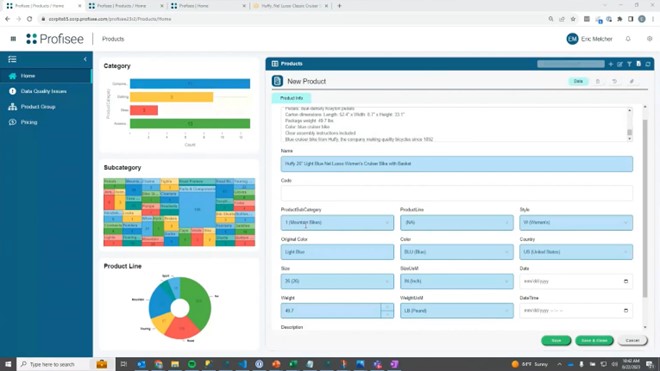
To enable this form capability, you can set the Form Design Behaviour Property setting for AI Role to Input (allow copy/paste function into the attribute) or Output (allow AI output to attributes on the form).
Feature #2: Stewardship in Outlook and Teams
- Microsoft Adaptive Cards – Private Preview
- Interactively with Profisee natively in Teams/Outlook
- More than a “link” – Share a record, edit data
Again, the goal here is to allow the collaboration of Master Data with the tools that we use every day. However, this capability is only viable using the SaaS offering.
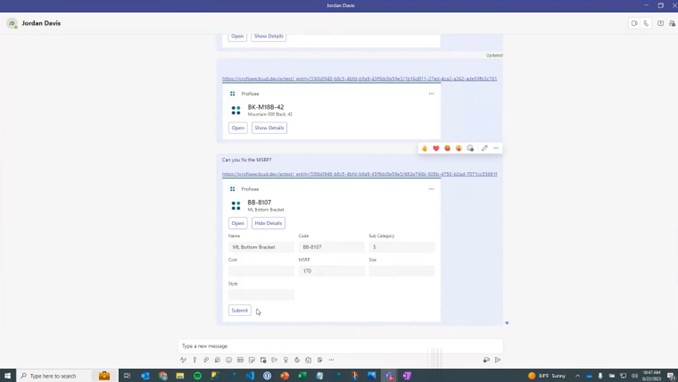
As an example, you can open a data record in a Profisee FastApp Portal form and click on the option to ‘Share to Teams/Outlook.’
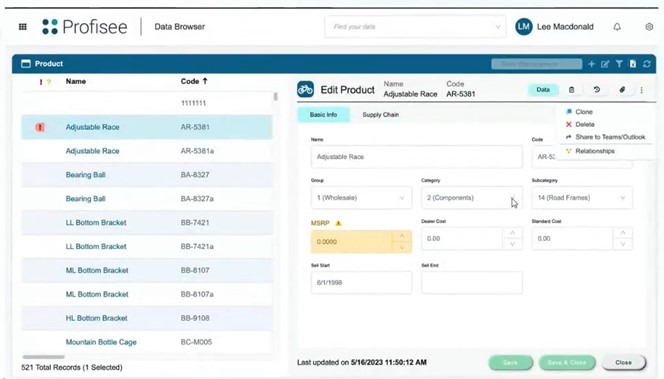
A dialog will prompt the user, allowing them to Share to specific people and make a comment for sharing to a Microsoft Teams Chat.
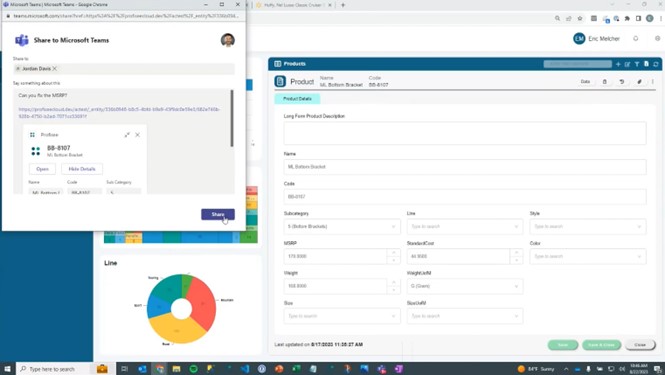
As per the screenshot below, the Profisee content is then shared over to the target user via the related Teams Chat. The user can see the shared content and directly click on the link back into Profisee.
However, the Profisee content will always be protected by the assigned permission settings within the Profisee User Administration settings. Therefore, if you shared something to someone that does not have access to the data, they will not be able to see it.
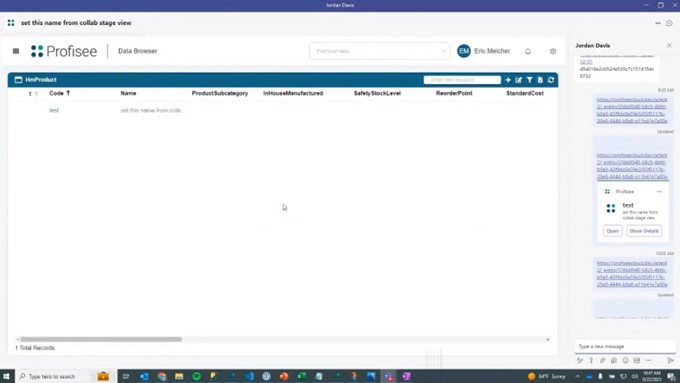
Opening from the shared link, you can see the shared record details in Profisee.
Other Enhancements
- ISO 27001 Certification
- Power BI Connector Enhancements – Data Quality
- Modernised Date/Time Picker – Stewards can now specify time
- Filter/Sory Dialog to React – Various usability enhancements, enabled Open AI Search
- Enhanced Health Checks – Improved environment monitoring in SaaS/PaaS
- Enhanced OAuth Flow – Improved option for secure authentication
- Removed Preview Machine Learning Feature (Replaced by Open AI)
Profisee release 2023 R1
The first Profisee release for 2023 is another exciting release because it:
- Gives customers a faster, more immersive stewardship experience
- Deepens Profisee integrations with Microsoft Purview and Power BI
- Introduces a new industry paradigm for integrating MDM and analytics
- Brings experience and performance improvements for SaaS and PaaS customers.
This follows the same theme from the 2022 R2 release late last year: Improving Data Stewardship and Microsoft Integrations.
Apart from that, there are also some very interesting features in this release with real-time visual data filtering, out-of-the-box data stewardship experience for any entity or hierarchy with no configuration required and — for the first time — letting customers embed their preferred analytics tool directly into Profisee to add additional context to master data side-by-side with tools such as Power BI, Tableau, Qlik and more.
At the end of the day, this will make a data steward’s job much easier as they can access all the information in one place (consolidated master data and reporting).
Let’s get straight to the new features of Profisee 2023 R1.
The sections below summarise the major themes of this release and highlight the new key features and enhancements delivered by Profisee.
Release Themes
The following diagram provides a snapshot of the key themes relating to this release:
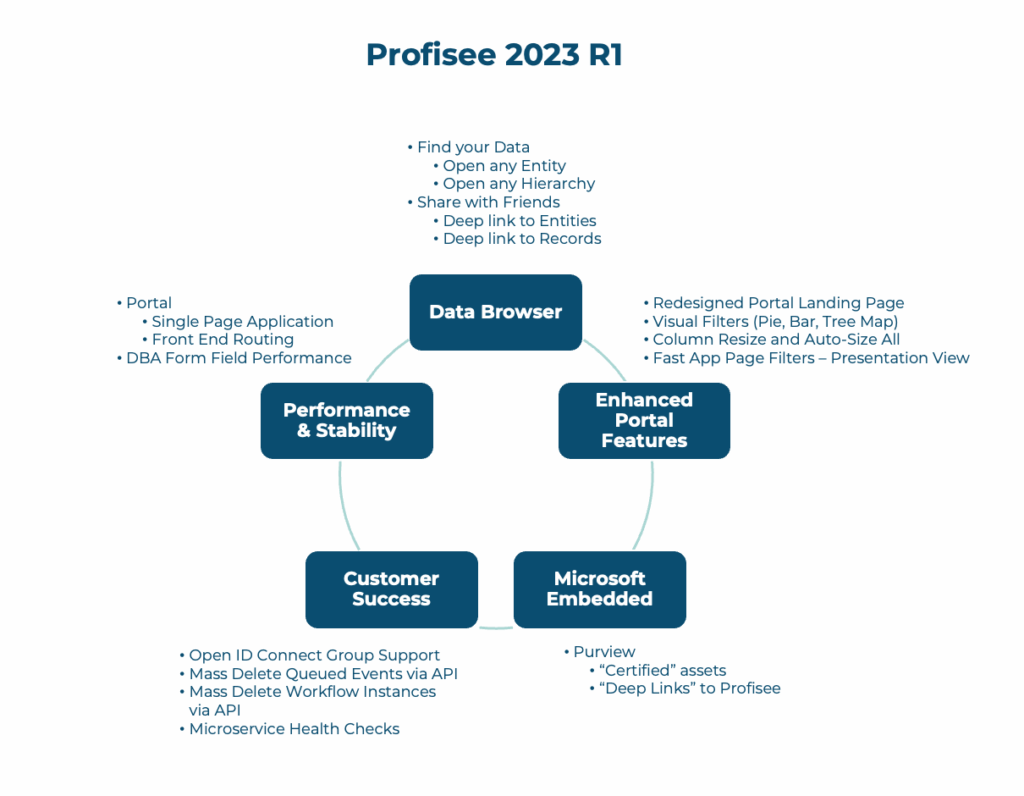
As mentioned, the same key message of this release follows up on the previous 2022.R2 release from late last year…
“… Continuous investment by Profisee in making data stewardship and management, a more visually oriented, immersive experience and continuous integration improvements for customers …”
Data Browser
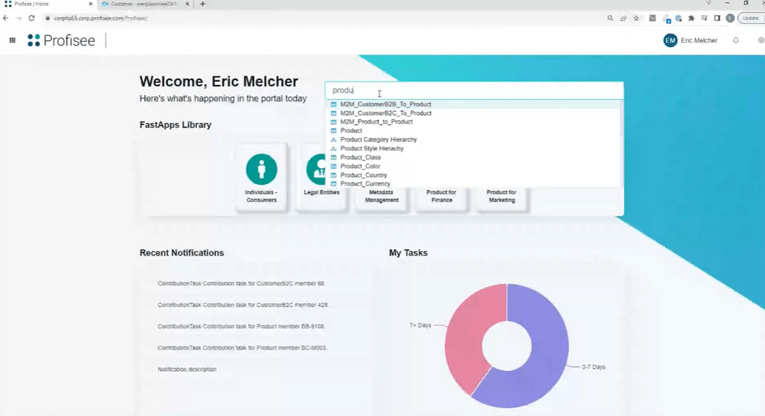
Profisee’s version of Google search but for entity data browsing? Sounds interesting.
Imagine you are on your FastApp Portal landing page, and you want to search/browse quickly for a specific entity like ‘Product.’ In past releases, you would either manually click into an existing portal application or use your local thick client application to browse your entity data.
However, with the new 2023.R1 release, you now can directly search, open, and browse any entity or hierarchy via an automatically generated data stewardship experience, while maintaining Profisee’s capabilities around creating curated FastApp experiences.
It is a handy feature and can save you a lot of time finding the information you need on the go.
Default Forms and Default Presentation Views
Default Forms and Default Presentation Views are leveraged when configured.
If no “Default” exists, a System Generated Form and/or Presentation View is generated automatically, presenting all available attributes of an entity.
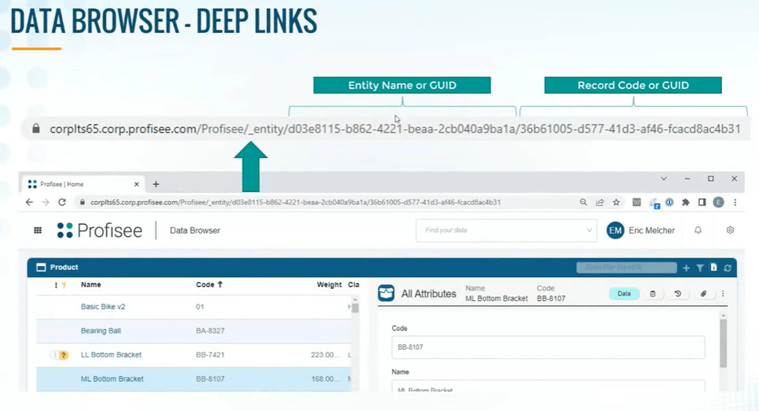
Deep Links to Profisee Data
Link to any Entity, Hierarchy, or Record in Profisee via a predictable and stable URL, enabling new ways for customers to build their data fabric.
For example, you can share the link with other Data Stewards via Teams or Slack.
Also, you can link from operational applications (ex. ERP or CRM) directly to Profisee and vice versa. This is all about making full use of the URL links available to you and share it with others.
Enhanced Portal Features
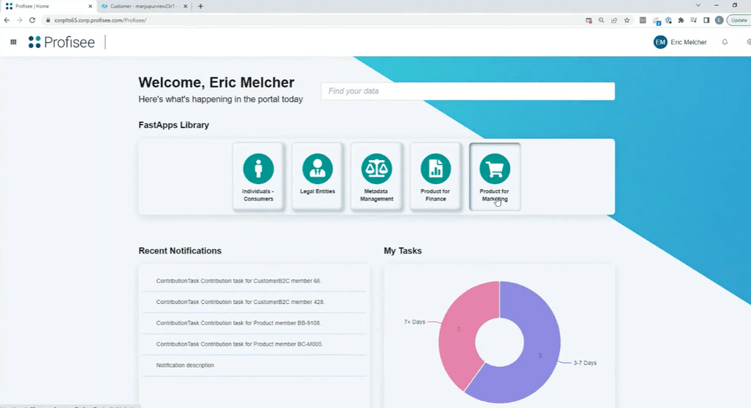
There is a fresh look and feel for the Profisee landing page with streamlined access to stewardship features. Overall, it feels sharper and makes better use of the page real-estate. In addition, there is drag-and-drop column resizing, auto-sizing, and auto-size all.
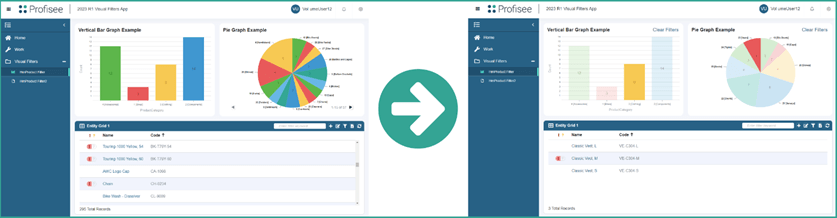
Built-in visual filters (Pie, Bar, TreeMap, etc.) make finding data natural and interactive. These filters give Profisee FastApp Portal users the ability to view a visual breakdown of the attributes of their data and to filter their data with a single click.
It has become evident in the last two releases that Profisee is heavily focussing on improving the visual data stewardship experience which is great for end users.
The reporting capabilities of other more established reporting tools such as Power BI, Tableau, and more can now be embedded into Profisee, which means Profisee has removed their internal reporting features/functions, which we believe is the right move.
Microsoft Embedded
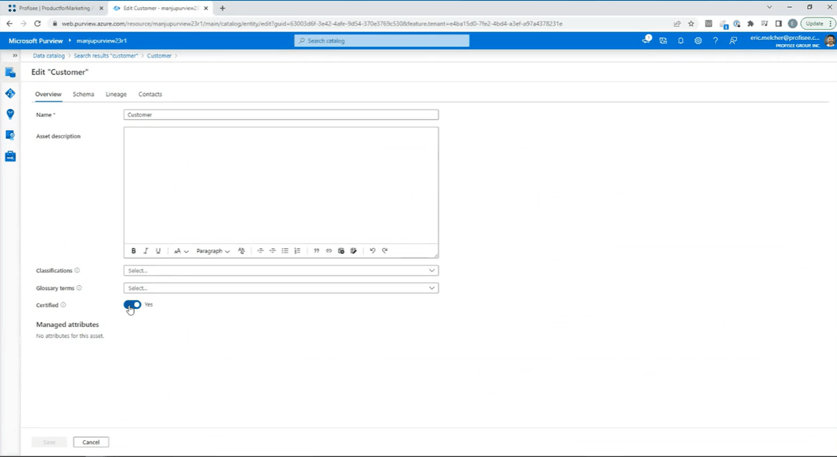
For those who is interested in using Purview, there is a new option to automatically mark Profisee assets in Purview as “Certified.”
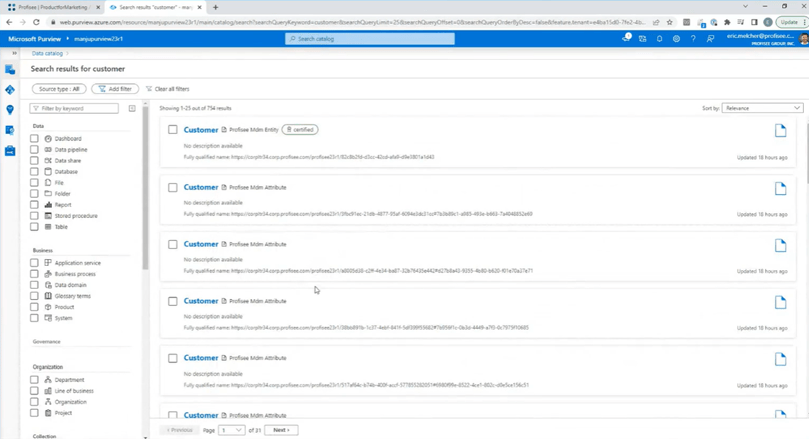
The new deep link from Purview to Profisee allows stewards to “Open In Profisee” any Entity or Hierarchy asset.
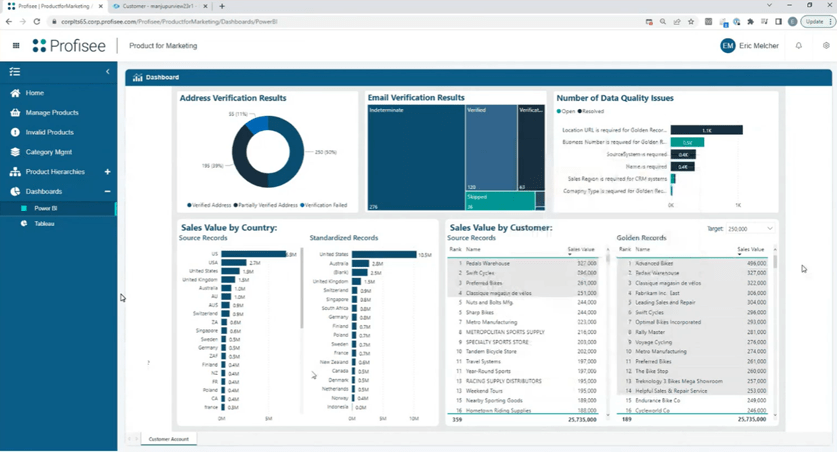
Power BI Reports in Profisee Portal – New Portal Page Report Control
Profisee has entirely overhauled its reports system in the Profisee portal, making reporting significantly easier to set up, use, and modify to your specific needs. New reports in Profisee are generated by Power BI reports, which can be embedded directly into a portal application for seamless integration.
What does this all mean for the users?
As part of the user experience, this allows customers to securely create “mash-up” experiences in Profisee – creating a more powerful Power BI experience within Profisee itself.
Users can embed a Power BI Report on a Portal Page (or Tableau, MicroStrategy, etc.) and securely embed content from other web-based products or applications.
Customer Success
Administrative User Enhancements
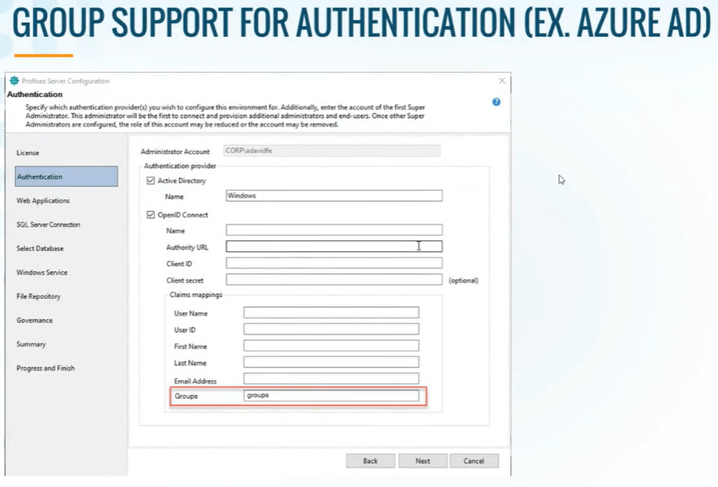
Open ID Connect Group support allows administrators to grant permissions to Profisee users using groups managed in Azure Active Directory, Okta, or any other supported authentication provider.
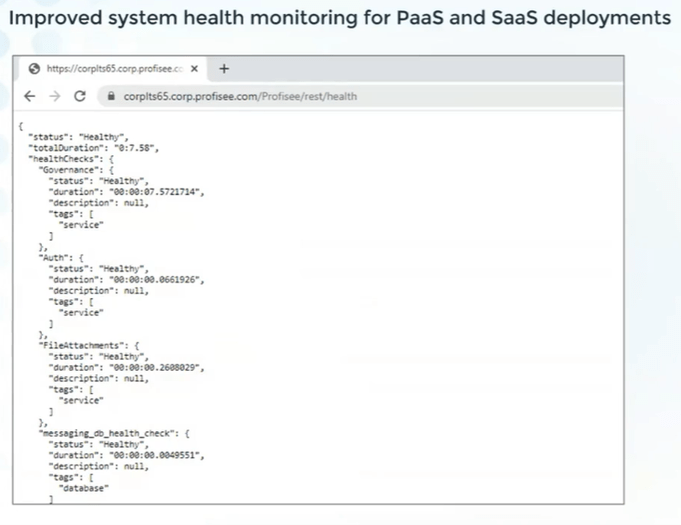
Microservice Health Checks are a more granular way of identifying the status of the Profisee Microservice, improving the management of PaaS and SaaS deployments.
Users can now diagnose issues with their instance using Health Checks. Simply navigate to the URL for your Profisee instance with the endpoint /rest/health to see a “Healthy” or “Unhealthy” status for four major services: Authentication, File Attachments, Database Messaging, and Logging.
Mass Delete of Queued Events or Workflow Instances provides a simplified recovery if a customer accidentally generates large numbers of events or workflows.
Performance and Stability (Portal)
Further improvements in relation to the Profisee portal include:
- Single Page Application: Delivers a much snappier user experience by eliminating page loads in the Profisee Portal
- Front End React Router: Enables deep links and improved performance by eliminating server requests as users navigate the web application.
- Improved Forms performance: Deferred fetch of lists and configurations, reducing load times and increasing responsiveness for large forms with many drop-down lists.