

The Profisee 2024 R1 release marks the debut of Profisee’s web-based administrative features, with additional functions planned for future updates to further enhance administrator accessibility. This release also includes important modifications to the Profisee REST API, ensuring optimal performance.
What’s new in 2024 R1:
- Release themes
- New Administration Portal and user experience
- Better auditing and monitoring
- Improved Data Integration
- Compact View for Efficiency – User Experience
- Create/Edit Entity from the Portal
- General UI improvements
- Enhanced Performance and Advanced Data Management
- New Data Quality Rules Expression
- Upgraded APIs
- REST Gateway Enhancements
- Integration with Microsoft Purview
- New Features for Data Modelling and File Management
- Improved SQL Resilience and Metadata Auditability
Release themes

“These updates focus on making data management easier, faster, and more integrated with existing tools and platforms”
New Administration Portal and user experience
A major update in this release is the introduction of the Administration section within the FastApp Portal, which enhances the web front-end experience by centralising administrative tasks into a more streamlined interface. This advancement aims to alleviate the common frustration of managing administrative functions through multiple tools and steps.
Initially, Profisee will offer web-based management tools for Connect and Monitor, paving the way for a more streamlined administrative process. This move aims to simplify and enhance the experience for administrators. I believe that future releases will expand this web-based management suite with additional tools.
Better auditing and monitoring
What does the Monitor tool ‘monitor’?
The new Monitor feature delivers a centralised view of all internal activities within Profisee, enhancing administrative oversight by enabling users to track various services and their statuses from a single dashboard. This consolidation of essential elements streamlines the troubleshooting process and improves overall management efficiency. It’s also great to see how the FastApp portal is being utilised more effectively than ever.
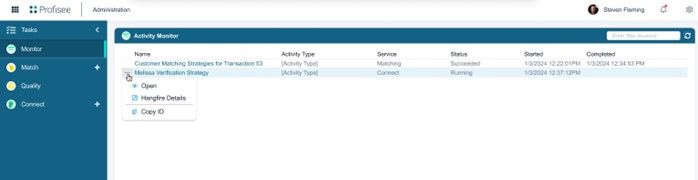
Activity Monitor zone provides the following information:
- Name: Displays the name of the activity being monitored.
- Activity Type: Indicates the type of activity under observation.
- Service: Shows the service that initiated the activity.
- Status: Reflects the current status of the activity, including options such as Running, Succeeded, Failed, and Timed Out.
- Started: Shows the date and time when the activity began.
- Completed: Displays the date and time of when the activity finished processing. This field remains blank if the activity is still ongoing.
Improved Data Integration
Profisee Connect stands out as a key feature in this release, and from my perspective, it is particularly noteworthy. Integrating new data sources and targets can often be more complex than anticipated, but Profisee’s approach to creating an intuitive, web-based, and configurable experience is quite impressive. Connect supports open standards like REST APIs and webhooks, making data integration more straightforward (designed to replace several legacy systems, including those for eventing and address verification).
While it incorporates MelissaData Personator for address verification, Connect is also flexible, enabling customers to integrate additional REST-based service providers as needed. This streamlined approach enhances both analytic and operational MDM, facilitating a smoother experience with popular external data providers. I believe this represents the direction in which the future of data integration is headed, focusing on streamlining and simplifying the process.
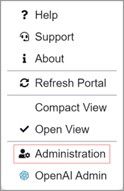
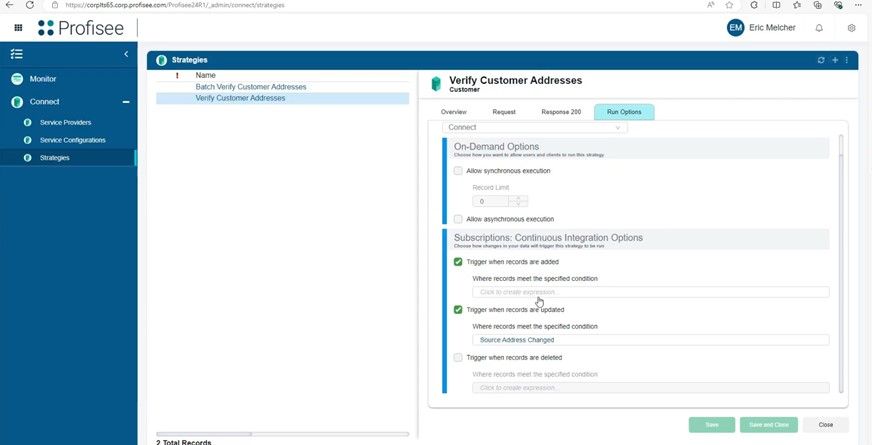
What does it look like? To manage connections in Profisee Portal, you would need to navigate to the Administration tab in Profisee portal to open the Administration workspace.
From here, click the Connect tab on the left-hand sidebar. Here, you can create, configure, and run Service Providers, Service Configurations, and Strategies.
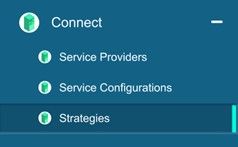
- Service Providers allow you to determine the provider for your Profisee connections. As of 2024.R1, the only available pre-configured service provider is Melissa Data. Custom Service Providers can also be used.
- Service Configurations allow you to set up vital information for your service provider (such as service type, location, and credentials) to enable integration.
- Strategies allow you to create rules and behaviours to control the integration process.
I’m excited to delve deeper into this area and experience the benefits firsthand soon. I see great potential in this tool.
Compact View for Efficiency – User Experience
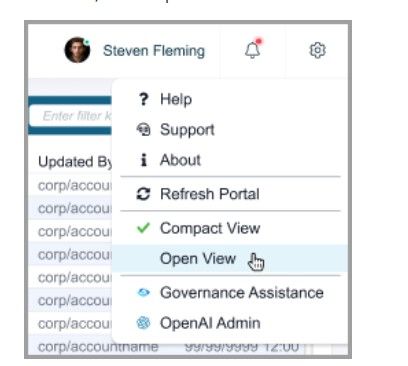
The Profisee Portal now includes an optional Compact View mode, which enables users to display more records and fields on the screen, thereby enhancing efficiency and usability. While this is a useful feature, it doesn’t seem to offer a significant improvement over the zoom in/out functionality provided by standard web browsers.
Create/Edit Entity from the Portal
When integrated with Microsoft Purview, users can now create and edit Entities directly within the Data Browser of the Profisee portal, providing initial web-based model administration capabilities. This integration represents a significant step in Profisee’s broader strategy to transition all administrative functions to the web in future releases.
General UI improvements
Numerous ‘minor’ improvements have been made to the Portal’s user interface, including updates to form headers, buttons, backgrounds, and scroll bars. Additionally, forms now feature improved tabbing functionality, streamlining data entry and navigation.
Enhanced Performance and Advanced Data Management
What are the performance enhancements in this release? One particularly noteworthy improvement is sure to catch your attention, so keep reading to find out more.
Firstly, with Connect, users can now leverage Melissa Data Personator for address verification, which delivers a dramatic performance boost—up to 734% faster in benchmark tests. This feature integrates seamlessly into the Profisee Portal, providing an efficient alternative to the legacy system while maintaining the existing address verification capabilities in Profisee FastApp Studio.
However, a significant performance boost lies with the introduction of the new built-in Change Data Detection to prevent unnecessary transactions when there are no actual data changes. For those who is familiar with this problem, in prior Profisee versions, record update requests would create transactions and update the Last Updated By/On fields, regardless of whether data changes occurred.
With this release, Profisee now assesses inbound requests to verify if any data changes are necessary.
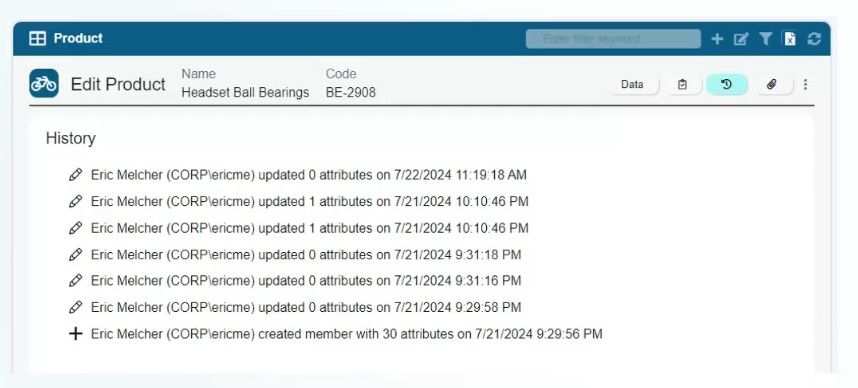
Transactions are now generated solely for records with actual changes, minimising unnecessary data transactions and associated tasks like Events, Workflows, and Continuous Matching.
This major improvement allows customers to load all their data into Profisee without the need to manually identify changes and ensures that bulk runs of Data Quality Rules only produce transactions for significant modifications.
Additionally, Data Quality Rules are now processed during the save operation, further optimising system performance. I believe future Profisee releases are expected to continue refining and enhancing these types of performance improvements.
New Data Quality Rules Expression
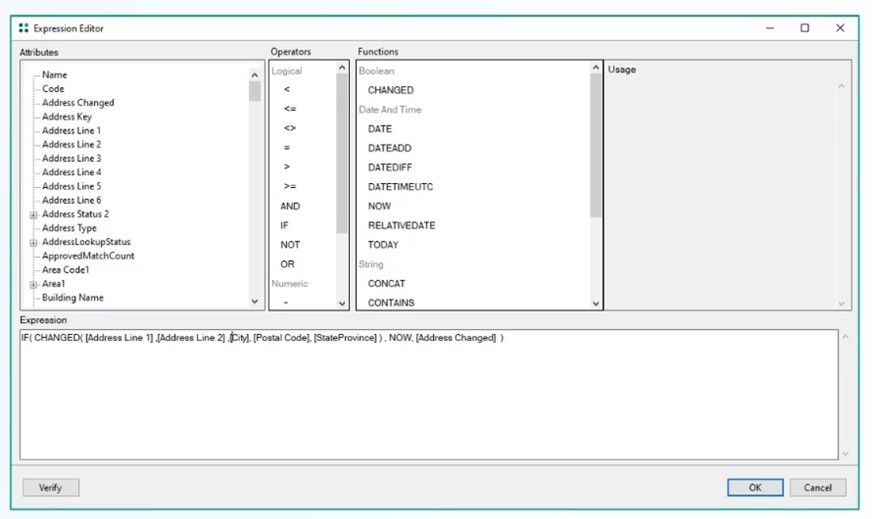
A notable and useful update for Data Quality Rules is the introduction of the new CHANGED expression. This feature evaluates whether one or more specified attributes have changed during a transaction, allowing assignments to be made conditionally based on these changes rather than always executing the assignment.
For example, you can now set a specific attribute to be updated (e.g., Address Changed set to ‘Now’) based on one or more changes in the specified attributes (e.g., Address Line 1, Address Line 2, City etc.)
Upgraded APIs
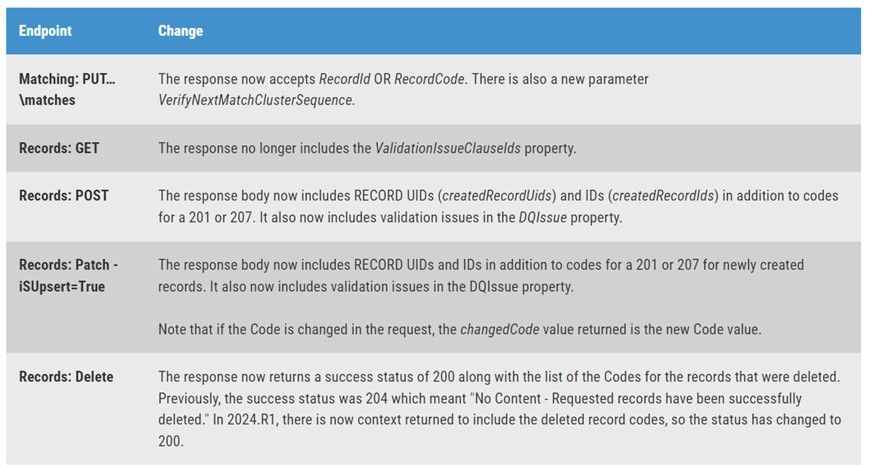
The latest update also introduces new REST API endpoints and enhancements, including improved record retrieval capabilities and more precise error handling. These changes facilitate better data querying and integration.
Please refer to the table below for information regarding these changes.
And many more…
REST Gateway Enhancements
Significant upgrades have been made to querying capabilities through the REST Gateway, including support for historical data queries and new parameters for filtering records based on changes and transactions.
Integration with Microsoft Purview
Profisee continues to expand its integration with Microsoft Purview, now supporting the latest Data Catalog experience. This integration allows users to associate Profisee entities with Purview Data Products, enhancing the native experience of Profisee data assets within Purview.
New Features for Data Modelling and File Management
Entity and attribute modelling is now available via the REST Gateway, and file attachments can be programmatically managed. These additions provide more flexibility and control over data management.
Improved SQL Resilience and Metadata Auditability
Profisee’s SQL Server implementation now includes enhanced fault tolerance and resiliency, while metadata changes are more thoroughly audited, providing a detailed history of attribute modifications and system configuration changes.