
Designworks is one of Australia’s leading suppliers to major and independent retailers. They design, develop, produce and market merchandise. If you have anything in your wardrobe or home from Everlast, Lonsdale London, Mooks, Mossimo – or branded with Bluey, Disney, Peter Rabbit or Warner Bros – now you know where they come from.

Designworks’ challenge: counting cents while losing dollars
This scenario is familiar to many finance professionals: A series of complex Excel spreadsheets – clunky and disconnected, requiring extensive levels of maintenance, rolled over every month and year.
This was the situation at Designworks – a very manual way of conducting budgeting and planning that was labour intensive, and not a very accurate way of running a business.
The business was growing and there was so much to consolidate, but it was difficult with just Excel spreadsheets.
There was also a disconnect between systems so they could never really drill down to a cost centre level. There was limited visibility and insights, and they knew things had to change.
The perfect fit? A tailored solution
Ben Challis, Head of Planning & Business Improvement at Designworks, already had a solution in mind.
In his previous experience at another company, Ben had used a planning solution called Workday Adaptive Planning. He knew it as a best-in-class solution that is configurable – you can retain the basic premise of its merits as a budgeting, forecasting and planning tool, while configuring it enough to suit your business.
Once Designworks brought on Workday Adaptive Planning, they went ahead to achieve several objectives together with implementation partner QMetrix.

Building a strong foundation – starting with data integrity
The first order of importance was achieving data integrity and providing accessibility. Through scripting, data is now securely transferred from the ERP to Workday Adaptive Planning automatically, at the frequency set by Designworks.
Now, finance have more control instead of needing to rely on IT when things broke in the old system. Within Workday Adaptive Planning, they can take the information, understand the numbers themselves, manipulate it for reporting, and all without IT intervention.
Post-implementation, finance now owns the full process in totality.
“Everything in the live environment is now much easier to track, trace, maintain and take snapshots of”, says Ben.
Reporting that serves the user
Once the data became accurate and accessible, they could start to pull reports. Being a design-led business, many users in Designworks prefer reports that are more visually focused.
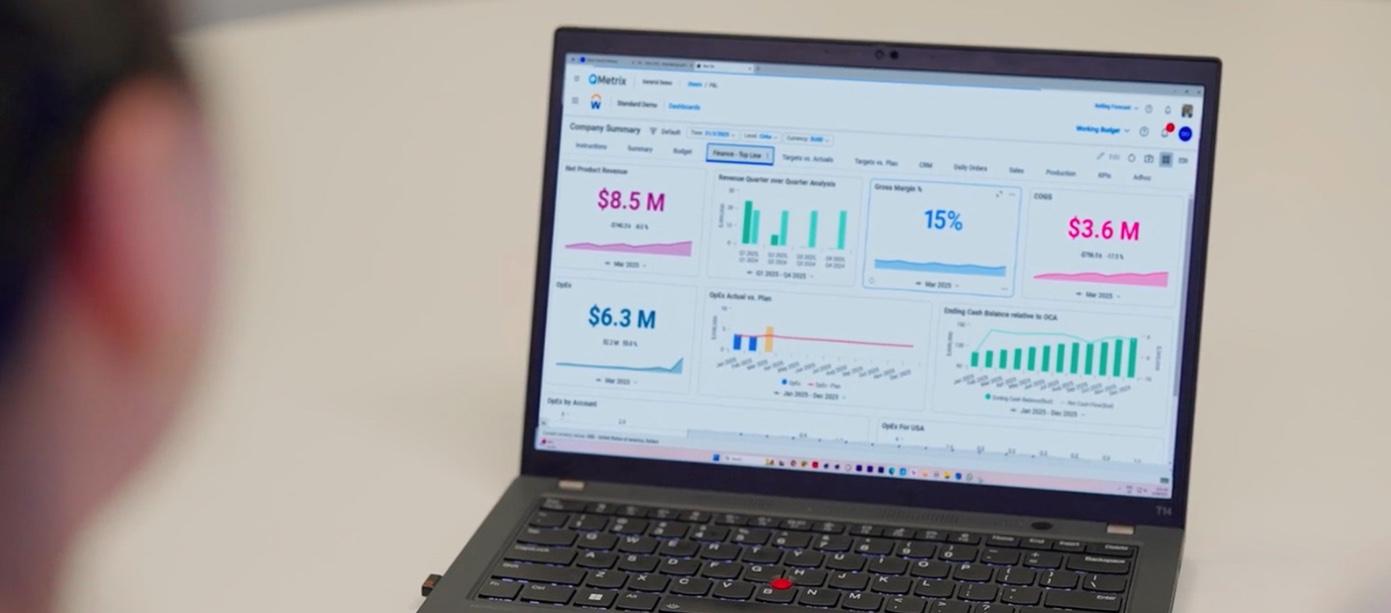
To cater for this, they built a series of dashboards with bar graphs and charts. They also created OfficeConnect reports which replaced a weekly management report that had been labour intensive to prepare.
Rather than having to request a finance team member to create and send a report, users now receive automated reports that take the finance team a much shorter time to compile since the data is all updated within Workday Adaptive Planning.
Users can also self-serve through simply filtering to get what they want, when they need it.
Planning with granularity – without the complexity and headaches
The mammoth spreadsheet at Designworks was the sales planning sheet. It was used to plan thousands of merchandise items at customer, department, category, brand and other levels.
Each tab had thousands of lines, done by month, with forecast versus budget versus actual versions. It was also linked to other spreadsheets. You can imagine the effort it took to maintain, copy and paste all that data.
It was an administrative burden and not always accurate.
In Workday Adaptive Planning, this has been replaced with the Sales Planning Model. The planning team enters information. Then, based on assumptions around financial forecasts, numbers are automatically calculated and flow into the income statement to form the forecast.
It also makes consolidation and comparison far easier. You can look at all of a retail outlet’s sales, compare it to customers of similar size, by brand, and more. The dimension and attribute functions in Workday Adaptive Planning have enabled Designworks to manage these intersections and their ability to scale further in future.
The model has replaced what was a series of 5 spreadsheets, and a ton of time and headaches.

Planning for the future with intelligence and insight
Traditionally as part of the budgeting and forecasting process, Designworks would take data from the existing year, put it in Excel, set assumptions, and go through an arduous process of pulling together numbers.
Now, data is always up-to-date in Workday Adaptive Planning, and they have set up assumptions such as percentage growth each year, factoring head count and CPI changes, or when rental leases start and finish. At any point in time, they can define a time period (such as 3 – 5 years) and Workday Adaptive Planning spits out the forecast of what it would look like based on those assumptions.
This has enabled a continuous rolling forecast that is a more accurate view of the business, rather than a typical 12-month budget that changes drastically every year and takes weeks to update.
In Workday Adaptive Planning, each month they spend 5 – 10 minutes on a particular area to make small incremental tweaks to existing numbers, then quickly review to ensure it is accurate based on assumptions.
This means Designworks are able to utilise Adaptive Planning’s driver-based planning and rolling forecast capabilities to plan further in advance, for specific time periods, more accurately, and with more insight.
People like it, and people are using it

“Bringing Workday Adaptive Planning on board has really changed the lives of the staff who used to input source data. They have readily seen the benefits of a smoother, cleaner, easier and more accurate process.”
– Ben Challis, Head of Planning & Business Improvement
Those who use the outputs of data love it too. Data is presented in a way that is friendly to how they look at the world.
Rather than an ugly Excel spreadsheet that needs to be manipulated, they can self-serve and view a good looking dashboard that tells a story right away.
Business Managers and other operational General Managers also look at the forecasts and budgets, or use dashboards specifically designed for them to report on cost centres or brand insights.
The way the data is displayed and easily accessible in Workday Adaptive Planning has made it easy for the wide variety of users at Designworks to adopt it.
Limitations like files rolling over, who’s doing, who’s checking, who wrote that formula in the cell – things that come with an Excel approach to Financial Planning and Analysis – no longer exist.
Choose the right partners to work with
“In my experience, the product is 50% of the battle, and the other 50% is the implementation itself – because you don’t get the full value out of the product if you don’t have an implementation that unlocks that value. It helps to work with a product like Workday Adaptive Planning. It makes everything possible”, says Ben.
“My experience with QMetrix has been fantastic, and I wouldn’t hesitate to recommend them to others. They were really professional and helpful. They took time to understand the intricacies of the business and the more complicated aspects, and approached the project with a resolution-type mindset to make it work.”
– Ben Challis, Head of Planning & Business Improvement
Impact for Designworks

Scaling the storefront with Workday Adaptive Planning
Workday Adaptive Planning helps finance teams with better Financial Planning and Analysis. Explore how it can solve your budgeting, forecasting, planning and reporting challenges.