
Profisee’s 2022 releases showcase a major architectural milestone by pivoting toward a turnkey, cloud-first platform designed to lower total cost of ownership (TCO) and integrate effortlessly into modern enterprise data fabrics. The key advancements for 2022 are the debut of its next-generation SaaS and PaaS offerings and expansion of native Microsoft integrations.
What’s new in 2022:
Profisee release 2022 R2
The last release for the year is an exciting release because it gives customers a new, immersive relationship management experience and brings many performance and stability improvements throughout the platform. Also, in 2022 R2, we see a new private PaaS deployment option, a significant expansion of the Relationship Visualisation system, and a variety of improvements to both the portal and administrative experience.
This is also an important release because we can see that Profisee continues to work closely with the Microsoft team to improve their existing integrations with the full Azure Data Services ecosystem as well as native integrations with tools such as Azure Data Factory, Azure Synapse, Microsoft Purview, Power BI and more.
Let’s get straight to the new features of Profisee 2022 R2.
The sections below summarise the major themes of this release and highlight the new key features and enhancements delivered by Profisee.
Release Themes
The following diagram provides a snapshot of the key themes relating to this release:
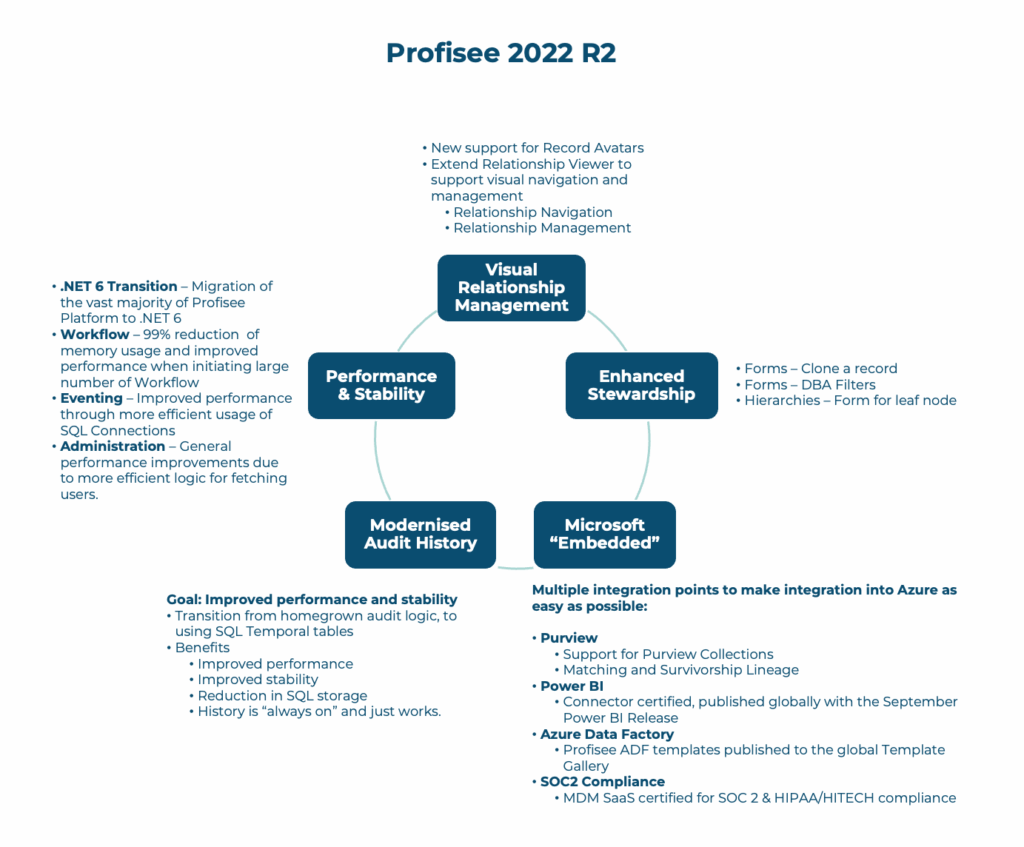
The key message of this release …
“… Continuous investment by Profisee in making data stewardship and management a more visually oriented, immersive experience and continuous integration improvements for customers …”
Visual Relationship Management
In this release, the relationship management experience has improved the way users visually navigate and manage their master data across all their interconnected data.
Relationship Manager
The Relationship Viewer was introduced by Profisee a few releases ago. During our previous client projects, we would often get asked by clients about the usefulness of the relationship visual aids.
To be honest; up until this release, we have not really used it at all. However, in this 2022 R2 release, there are further enhancements to the Relationship Manager such as record avatars (read next section) and better navigation/UI/UX changes to the interface that makes the Relationship Manager a much more useful tool than ever before.
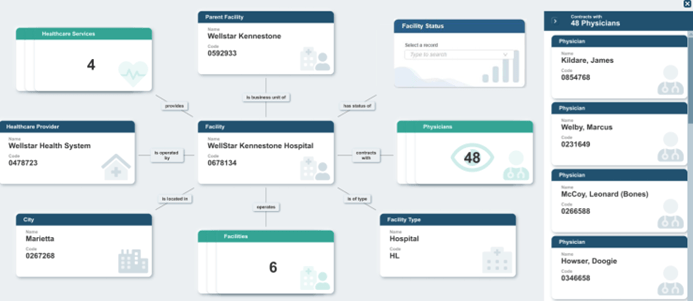
Firstly, the interface presents the user with relationship cards that display the entities within a relationship, the attributes of those entities, and how those entities are related to each other. You can right-click on an entity member and select View Relationships to quickly see the related linkages between members, open relationships in full screen mode (F11) or just quickly close the relationship viewer by clicking on the X icon on the window (or press ESC). Particularly useful short-cuts.
As for navigating the Relationship Viewer, we can now display a relationship using one entity within the relationship as the subject, displaying all related entities with their appropriate predicates. If there are multiple entities in the same relationship, entities will be shown as a ‘stack’ of relationship cards. Overall, this provides for better organisation and presentation of relationship cards.
Record Avatars
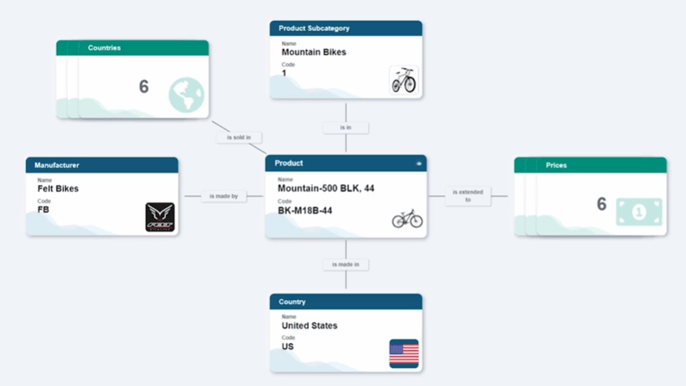
Users can now attach images to records in the FastApp portal to be used as icons to replace the default entity icon for a record. These icons are prominently displayed in the Relationship Manager, allowing users to navigate complex relationships more easily in a visual manner. By using these custom avatars/images, it helps the user to quickly identify specific data domains in a relationship.
Enhanced Stewardship
Several handy new features were added to the form controls. Albeit minor changes, they make the data stewardship experience a much more seamless process.
These features continue to be making data stewardship simpler to manage by adding features that make it easier to clone existing records, dynamically filter pick lists so users can more quickly make the right selection, and streamline access to records when managing hierarchies.
Cloning Records on Forms
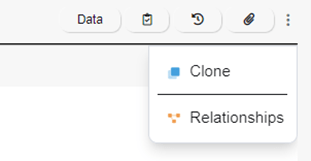
In the FastApp Portal, records can now be cloned directly from a form, allowing users to make exact copies or modified copies of existing records.
Presentation Views on DBA Forms
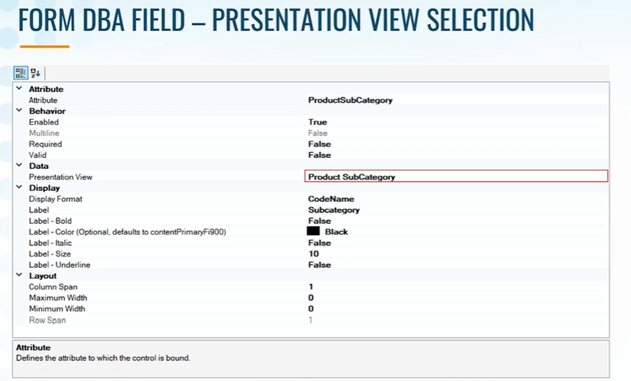
In the FastApp Studio, a new Field Control property has been added. This property allows administrators to use a Presentation View to specify Filter and Sort functions on Domain-based Attributes (DBAs).
This feature has been one of those highly voted ideas by the Profisee community. This added control over the presentation view for DBA members makes the user experience much more meaningful for the targeted audience and use case.
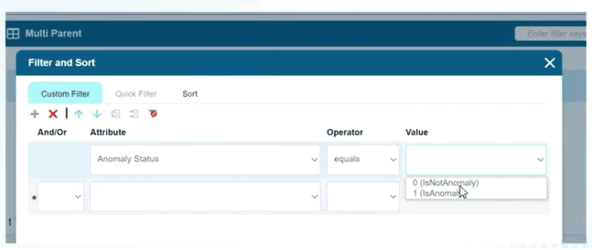
Multiple Parents in a Relationships
In the FastApp Studio, administrators can now use the Manage Field Relationships option to assign multiple parents to the same child attribute without needing to duplicate the child attribute. It is all about less clicks to achieve what you want to do.
Default Forms
In the FastApp Studio, a new Form property has been added to allow users to specify a default form to be used for the Relationship Manager.
Microsoft “Embedded”
Customers using Microsoft and Azure technologies can now access the following updated integrations and features:
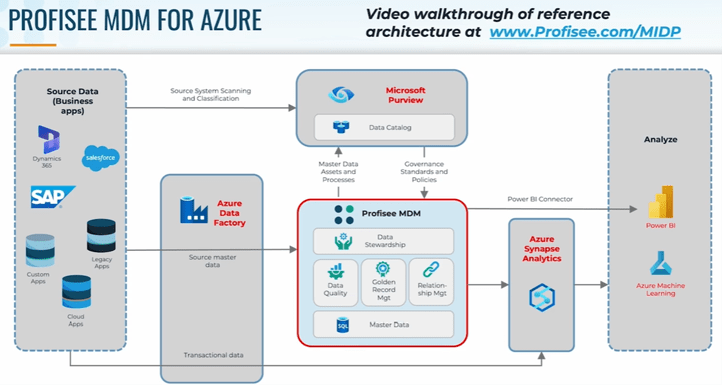
Microsoft Purview
Expanding on the existing Profisee-Purview integration — which already bi-directionally shares master data assets, MDM processes, data governance standards and policies between Profisee to Purview — the integration now supports collections, data certification notifications and data lineage. Profisee and Purview continue to be “better together,” operating with natural synergy as Profisee enforces the data quality and governance rules specified by Purview.
Power BI
The Profisee Connector for Power BI, which was released in February 2022, is now certified officially by Power BI and will be shipped as a seamless part of its upcoming release.
The Power BI Connector simplifies access to complete and consistent ‘certified’ master data for Power BI users and further democratises data-driven decision making — even for those unfamiliar with MDM or the Profisee platform.
This is great news for existing Power BI users. As Power BI becomes further integrated with Profisee, we can see the reporting capabilities of Profisee becoming more powerful in the future.
Azure Data Factory
Profisee is the first MDM vendor with several pipeline templates available natively in ADF to simplify and accelerate the creation of data flows for MDM. This is another idea which was highly voted by the Profisee community – where ADF pipeline templates would assist the development process between ADF and Profisee.
Publish to Azure Synapse
Use pre-built ADF workflows to quickly publish “certified” master data from Profisee MDM to Azure Synapse. Access to complete, consistent, and current master data in Synapse reduces friction in data flows to support sophisticated data analysis.
SOC2 and HIPAA compliance
Profisee MDM SaaS has been certified for SOC2 and HIPAA compliant by independent auditor A-LIGN, giving customers additional peace of mind when hosting and managing their data with Profisee.
It is good to see Profisee actively and rigorously evaluating their MDM platform with external certification authorities.
Modernised Audit History
In 2022 R2, Profisee has implemented a new history architecture that maintains a robust audit trail, while significantly improving overall system performance, reducing the load on the data tier and reducing the overall database size.
Audit history for specific entities cannot be turned off. Record history is now managed by SQL Server temporal tables. This reduces Profisee transaction processing, improves reliability under heavy loads, and reduces database file size.
Also, a new system setting ‘History Retention Limit Days’ allows users to limit the number of days history is logged in the system, allowing for faster system processes.
Performance and Stability
Significant architectural investments have yielded even better performance across the system for both batch and real-time operations. Profisee has also reduced memory usage and improved performance for customers running high volume operational workloads leveraging workflows, events, and large data steward communities.
Miscellaneous Performance Improvements
Version 2022 R2 introduces a variety of meaningful performance improvements to the Profisee platform due to changes in the history architecture.
Based on the studies by Profisee, these improvements were benchmarked using sample Profisee configurations and data to capture an estimated improvement over prior versions of the platform. These reported improvements include:
Staging: Staging Merge table performance is 26% to 41% faster depending on number of records, attributes, and changes made.
Matching and Survivorship: Matching performance is 50% faster and Survivorship is 40% faster.
Data Quality Rules: Data Quality rules run over 50% faster.
Workflows: Reduced memory use by as much as 99% in scenarios with large numbers of active Workflow instances. Initiating and completing Workflows is up to 22% faster.
Merge API: Reduced memory use by as much as 74% while processing requests with thousands of records.
Accounts and Teams: Selecting and applying permissions changes now process twice as fast.
Profisee release 2022 R1
The first release for the year from Profisee introduces a range of new backend features and improvements such as:
- additional functionality available in the REST API
- webhooks to support real-time integration between external systems
- a Power BI Connector
- restructuring of Workflows to require fewer dependencies.
Most notably, this release also incorporates the exciting launch of Profisee’s fully hosted and managed deployment (SaaS) option.
Let’s get straight into the new features.
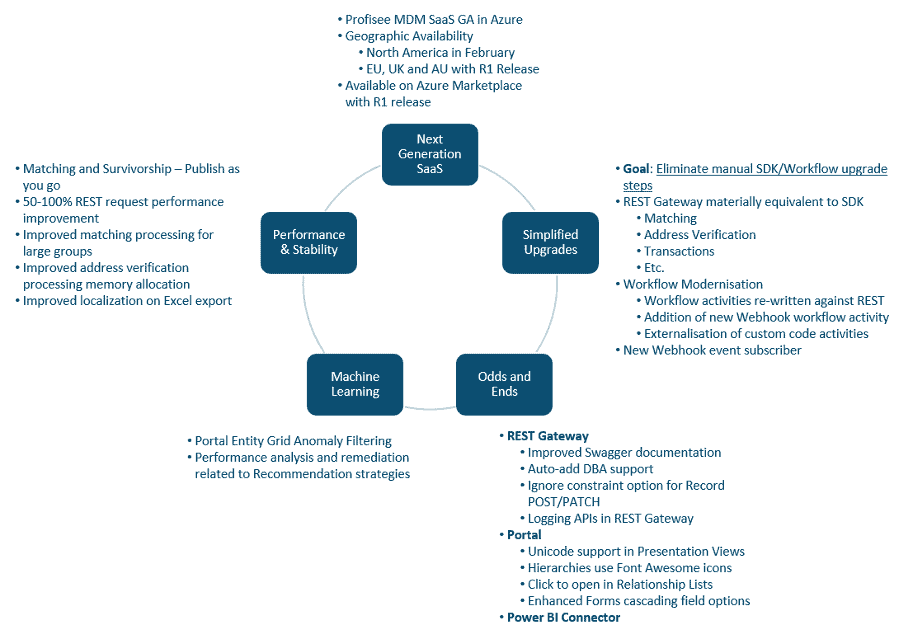
The key message of the Profisee 2022 R1 release is “…Simplifying adoption of Profisee MDM Platform, improvements in its backend features and overall flexibility for customers…”
Next Generation SaaS
The major focus of the Profisee 2022 R1 release is the full SaaS offering – now available to our customers in all regions.
How does the Azure SaaS deployment benefit a customer?
Key benefits of the SaaS offering include:
- Modern architecture
- Low Total Cost of Ownership
- Fully Managed
- Highly Available
- Feature-rich API
- Secure by Design
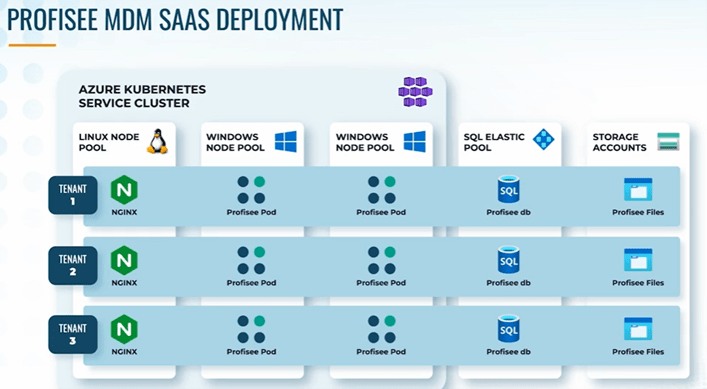
Profisee has taken care of the hard work for you. This includes creating and hosting multi-tenant containers in Azure and providing a true SaaS experience such as full tenant isolation incorporating a secure by design architecture.
Automated geographical failover is supported via constant replication of data between region pairs.
Simplified Upgrades
One of the major challenges for customers who leverage custom SDK code and workflows is the manual rebuild step required during an upgrade.
The SDK, WSG and Custom Subscribers are version specific, so any custom code always needed to be recompiled. Not to mention, workflows would need to be re-referenced, re-registered and re-tested.
To support more seamless upgrades, Profisee has invested a lot into two key functional areas:
- Profisee has continued to expand the REST Gateway’s functionality so that customers can now externally develop the logic they need leveraging the REST Gateway, and be confident it works consistently between versions.
- Workflows now have fewer platform dependencies and require less re-configuration. New Webhook components enable additional integration options and externalisation of custom logic so that future upgrades become simpler.
REST Enhancements
With the 2022 R1 release, Profisee has extended the REST Gateway to include broader coverage of what customers would want to do with the SDK.
There is an endpoint for address verification now. This includes both verifying individual records as well as running address verification jobs.

There are Data Quality Rules endpoints to access metadata.

The ability to trigger events via REST gateway.

Logging information is now available via an endpoint.

Matching operations (ie, lookup before create, matching and unmatching records, and execution of matching strategies) and many more.
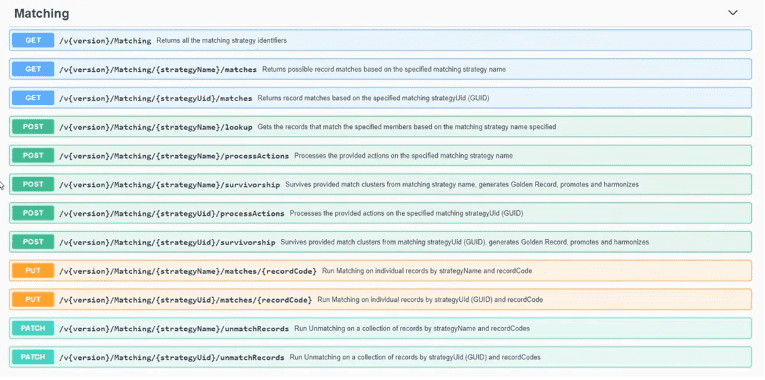
Another customer requested feature was to include an option to automatically add new DBA values. This was previously a staging feature but has now been extended to the REST Gateway insert and update methods.
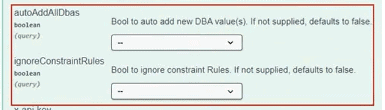
The REST Gateway is really becoming a place with everything you need. Developers would be incredibly happy with these improvements. You can even send notifications via your framework and access transaction information, including reversal transactions.
Further, Profisee has improved the documentation in Swagger to assist customers who are developing integrations using the REST Gateway.

Workflow Mordernisation
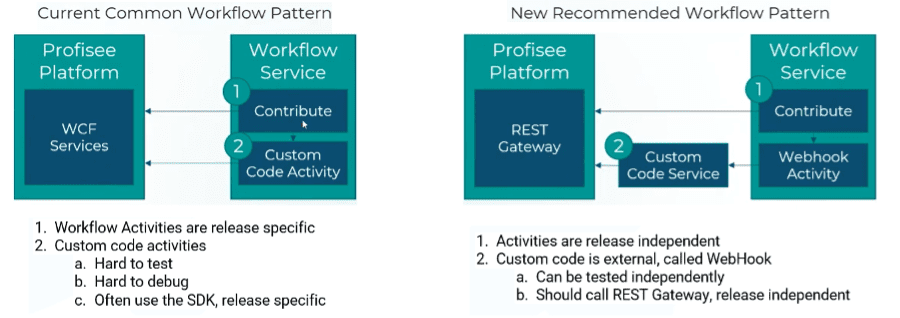
Workflows have been redesigned to simplify deployments and upgrades. Now requiring only XAML rather than a full complement of assemblies, webhooks will now be used to decouple complex code requirements.
Unfortunately, Profisee is not able to just upgrade the existing Workflows. When upgrading to 2022 R1, you will have to recreate the new Workflows. While it may be an onerous task, we reckon it is worth doing.
The good news is once you have ‘modernised’ your Workflows, upgrades with future releases will get easier. Furthermore, the new architecture affords greater flexibility such as using external code and using any language/frameworks.
The below image shows differences between the current common and new recommended workflow (REST Gateway) patterns. Note the addition of the Webhook activity in the new 2022 R1 release.
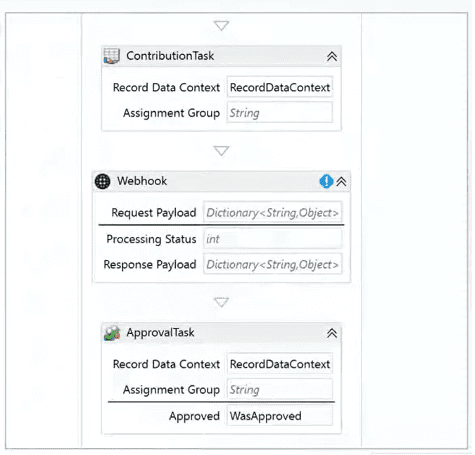
So what does the Webhook component look like? Like the existing Workflow components, you can drag/drop the Webhook component into your project template in Microsoft Visual Studio.
Webhooks benefits summary

Profisee is in the process of putting together additional resources to help you with 2022 R1 Workflow Migration, such as a best practice guide and academy course, so keep an eye out for that.
At QMetrix we can help you with the modernisation process – contact us to discuss how.
Webhook Subscriber – Enables Better Architectures
Profisee subscribers also support the same webhook functionality. The out-of-the-box Webhook subscriber allows customers to externalise business logic to a service running alongside the platform.
Some of the benefits include:
- decoupling custom business logic from Profisee
- better enabling 3rd party services to be leveraged (such as Azure functions, Azure service bus)
- removing the need to develop custom code with the SDK
- adopting the REST Gateway eliminates an upgrade activity between releases
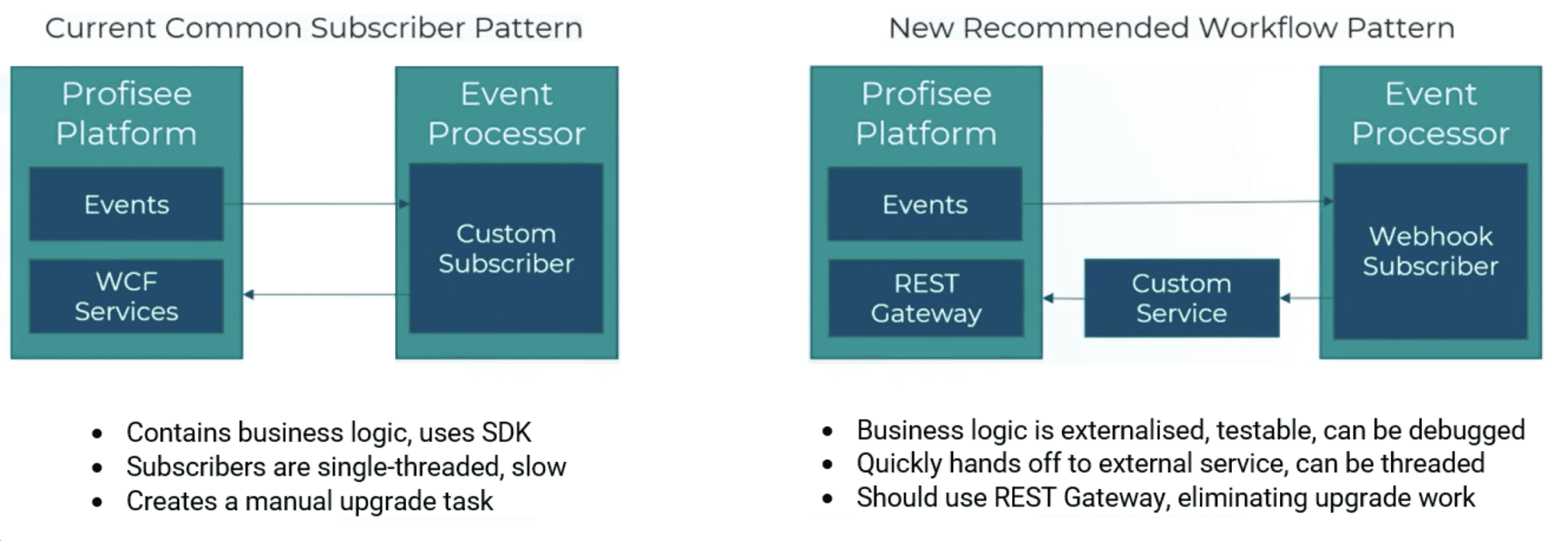
The Webhook subscriber gives you the familiar look and feel alike the other subscribers in previous releases. You have ‘Properties’ you need to fill in as normal.
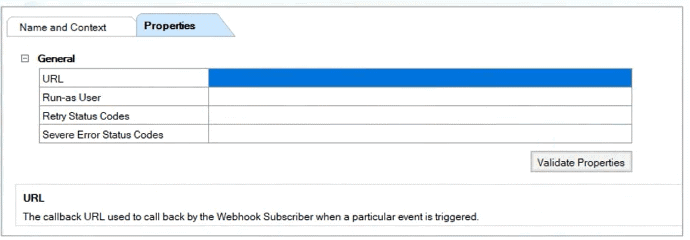
What is great about this subscriber is that a lot of customers want to integrate their Profisee solution with standard messaging platforms such as Azure Service Bus, Event Grid or Kafka. All those are callable via Webhooks.
Odds and Ends
A swathe of other enhancements made it into this release. A lot of these were largely driven by customer feedback with regards to REST Gateway, Portal, and the Power BI Connector.
Portal Enhancements
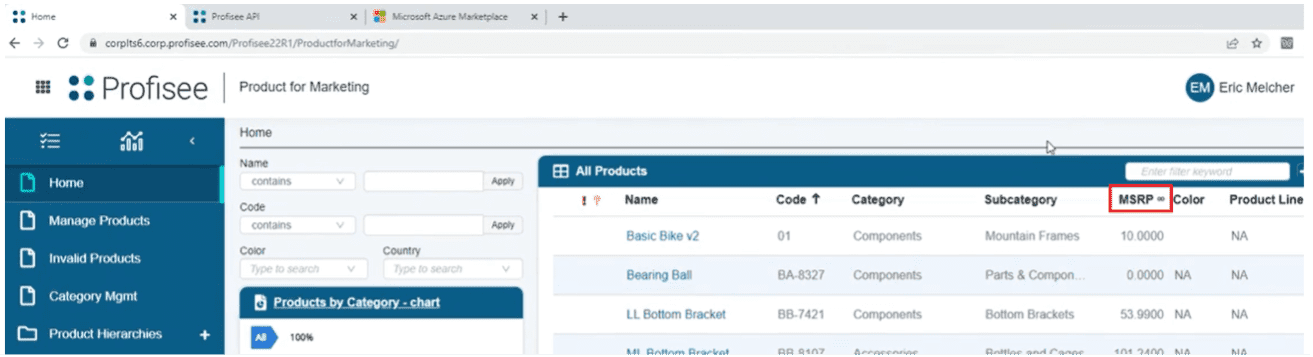
Unicode support in Presentation Views – adding diverse types of symbols in headers. A small but handy feature.
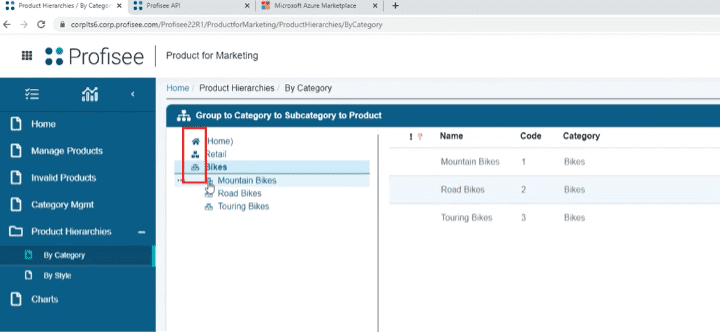
Hierarchies use Font Awesome icons – ability to add icons to Hierarchies. This makes it easier to ‘read’ the Hierarchies.
Click to open in Relationship Lists – adding the ability to open form via Relationship Lists

Enhanced Forms cascading field options – these can now cascade to more than one field.
Power BI Connector
Commonly customers want to report on their Profisee master data using Microsoft’s hugely popular Power BI. First released in 2021, the Power BI Connector is getting much more love in this 2022 R1 release.
Key changes include a much smoother user experience, with the integration leveraging your Profisee security privileges. Therefore, you can only see entities and attributes for which you have the necessary permissions.
Read more about the Profisee Power BI Connector here.
Machine Learning
Profisee has been putting substantial investments into Machine Learning, with stability, performance, better filtering and so on. They have also been collaborating with early adopters to fine tune algorithms and the data stewardship experience.
We expect more of these in the 2022 R2 release. Watch this space for future release information.
Performance and Stability
Lastly, performance and stability are always an important topic to discuss. With every new release, Profisee refines and tunes existing functionality.
Miscellaneous Performance Improvements
2022 R1 introduces a variety of meaningful performance improvements to the Profisee Platform. These improvements were benchmarked using sample Profisee configurations and data to capture an estimated improvement over prior versions of the platform.
These improvements include:
- Matching: The Matching process has been optimised for large groups, resulting in a 40% improvement in processing speed for these types of strategies. Smaller improvements are expected on smaller strategies.The Matching process now experiences reduced memory allocations during Continuous Matching. The Matching process now experiences fewer interruptions and higher stability compared to previous releases.
- Survivorship: The Survivorship process now experiences fewer interruptions and higher stability compared to previous releases.
- Address Verification: There has been improved memory allocation during address verification processing, resulting in increased performance when a large matching index is loaded.
- Update (REST Record Patch requests) : Throughput of requests ranging from 50% to over 100% based on number of records and attributes in the request and the request frequency, have been improved on.
- Portal Forms: Saving large forms with assignment rules related to form fields has improved, cutting the time by 100% for some large forms.
Common Questions
What happens to my existing workflows when I upgrade to 2022 R1?
They will still be in the system but disabled.
How do I migrate my workflows to 2022 R1?
They must be recreated in 2022 R1. QMetrix is able to help with this.
Are custom code activities in workflows supported in 2022 R1 and beyond?
No. With the 2022 R1 release, Profisee no longer supports custom workflows activities.
Why did Profisee make this change?
Profisee wanted to address the #1 upgrade blocker, based on customer feedback.
Are custom subscribers supported in 2022 R1 and beyond?
- On-prem and PaaS Customers: Yes, but Profisee recommends transitioning from the SDK to REST.
- SaaS Customers: No. Profisee are intentionally blocking customer authored code in Profisee SaaS.
Will the SDK/WSH still be supported?
Profisee will continue to support the SDK for several more releases so customers can migrate to REST. However, the SDK will eventually not be supported as Profisee will fully transition to .NET Core.
Can I still write code using the SDK/WSG?
Yes, but we recommend all new developments be performed against the REST Gateway.
Can I use the SDK in a Profisee MDM SaaS environment?
No, you cannot. The SDK is disabled for use in a SaaS environment so that Profisee can upgrade SaaS customers cleanly between releases.