
The Workday Adaptive Planning 2023 R2 release aims to improve the overall user experience and performance for financial planning and analysis (FP&A) teams with enhanced reporting interactivity, improved performance for large data sets, and introducing new dashboarding capabilities.
Analysis – Reporting and Dashboards
Web Reports
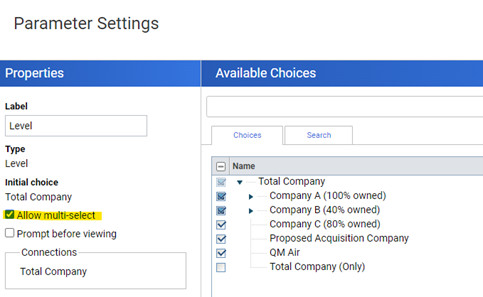
Please note the following exclusions for multi-select filtering
- Time, Version and Currency filters
- Sheets and Mapping dimensions (dashboards)
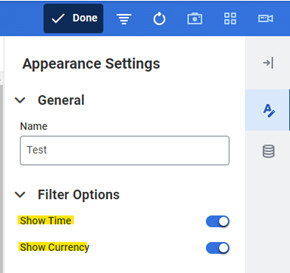
In addition to the multi-select filtering, users are also able to hide the Currency and Time context filters in dashboards to help consolidate the context filters and to remove unnecessary noise.
Model Management
Version Queuing
An update has been made in the way versions are handled in model management. When a new version is created, it will now automatically be visible in the version tree, and will include a status to show whether the version is “In progress”, “completed” or “failed”.

Versions will also process in the background, allowing users to navigate away from the admin page whilst the version is still processing, preventing time out issues.

Access Rules
The way access rules operate has also been updated with the addition of the “Grant all except” feature. A great example of this is that if a user needed access to all cost centres, except for 1 the rule would give them access to everything except the 1 cost centre mentioned. Previously it would work in reverse.
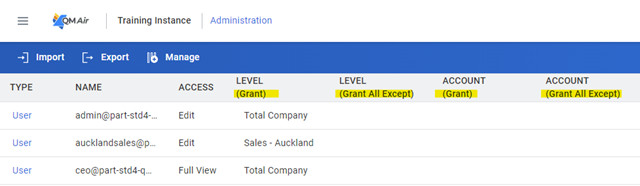
Performance
Sheets
Workday are continuing to improve the performance of cube sheets in dashboards. In the latest release, dashboard developers were given the option to choose a performance optimised sheet allowing users to modify and save the data enabling faster sheet load and save times. In 2023R2, cube sheet rate functionality can be run in an optimised mode. In its simplest terms, this will mean that users can edit, delete, copy, paste and save data within their optimised cube sheets. To enable this, navigate to the data settings.
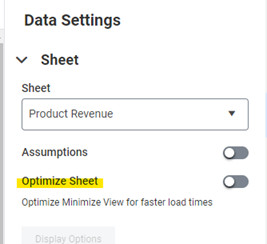
Improvements have also been made to the performance of web and OfficeConnect reports. Users can now run large, multidimensional matrix reports much more efficiently and with greater flexibility around the number of intersections possible.
NetSuite Specific Customers
Workday now manage the NetSuite Consumer Key and Secret for new credentials created. This will simplify the creation of credentials and the maintenance moving forward. This will not impact any existing NetSuite credentials or configurations present.
Integration
Workday have provided a new “Replace” import mode which will allow users to import into a standard sheet without needing to erase first. Only values that have changed will be updated/deleted.
*Note – this feature was released previously for cube sheets
That wraps up our favourite enhancements from the Workday Adaptive Planning 2023 R2 release! Reach out to one of our consultants if you would like to learn more.
Connect with us and stay up to date with Workday Adaptive Planning news and releases: